

- Release
- WordPress
File Manager for Dropbox 1.3.18 Released – Gallery Bulk ZIP Downloads
Tanin Ahmed6 min read
Loading page…
Loading page…
Loading page…
Learn how to import complete YouTube playlists into WordPress using WP Media Player. Build responsive video galleries, boost Core Web Vitals, and customize player branding in minutes.

Manually embedding YouTube videos into WordPress one by one is slow and clutters your site layout. In this guide, discover how to batch-import entire YouTube playlists in 1 click and build fast, responsive video galleries using WP Media Player.
While WordPress natively supports standard video embeds as documented in the WordPress.org Official Embeds Documentation, individual iframe embeds slow down page loading and scatter viewer attention across external channels:
| Feature | Native YouTube Embeds | WP Media Player |
|---|---|---|
| Batch Import | Manual copy-pasting for each video | 1-Click import of all videos, titles & thumbnails |
| Layout & Styling | Rigid single-video iframe container | Interactive Playlists (Sidebar List, Grid, Carousel) |
| Performance | Heavy upfront third-party JavaScript scripts | Smart Load Strategy (Eager, On Visibility, On Play) |
| GDPR & Privacy | Default tracking cookies enabled | YouTube-NoCookie & Privacy Mode built-in |
| Audience Retention | Recommends outside competitor videos on finish | Keeps viewers focused within your own video queue |
| Lead Generation | None | Custom Overlays (Email capture forms & CTA buttons) |
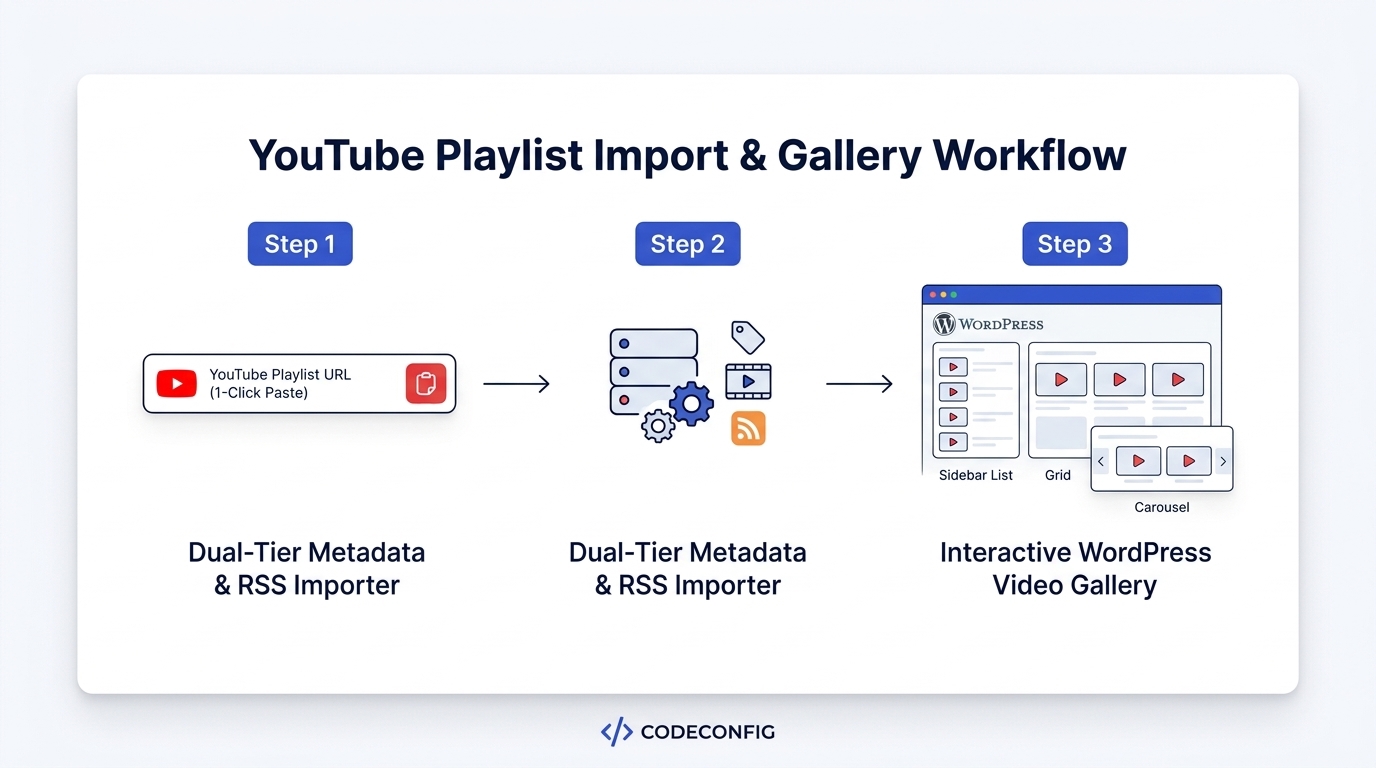
WP Media Player uses an intelligent two-tier architecture designed for maximum reliability:
Navigate to YouTube, open the playlist, and copy the full URL from your browser address bar:
https://www.youtube.com/playlist?list=PLxxxxxxxxxxxxxxxxxxxxxxxxxxxxxxPaste your playlist URL into the input field and click Import. The engine automatically fetches video records, attaches HD posters, and populates your playlist queue.
Option A: Native Gutenberg Block — Add the WP Media Player block, choose Playlist, and select your saved gallery.
Option B: Shortcode (Page Builders)
[wp-media-player type="playlist" id="1" layout="grid"]On Visibility or On Play load strategy so YouTube assets only load when readers scroll near the player, preserving 90+ PageSpeed scores.Importing YouTube playlists into WordPress is fast and effortless with WP Media Player. With automated batch imports, resilient fallback handling, and responsive playback layouts, you can launch beautiful video collections without sacrificing website speed.
This post is by Tanin Ahmed, a member of the CodeConfig team who is always working to find solutions for our users and improve our services.
Thank you for reading and for your kind words and good wishes for us. We truly appreciate your support! ❤️


Whether you're just getting started or scaling fast, we've got you covered. Access helpful guidance.
