

- Release
- WordPress
Integration for Google Drive 1.4.21 & 1.4.20: Root Folder Locking, Smart Downloads & PHP 8.4 Polish
Tanin Ahmed9 min read
Loading page…
Loading page…
Loading page…
Integration for Google Drive 1.4.19 is here! Discover customizable column visibility and headings, intelligent fuzzy search with custom synonyms, direct single-file streaming downloads, and seamless Gutenberg block editor integration.
We are excited to announce the release of Integration for Google Drive 1.4.19. This release brings powerful customization and performance features, including table column visibility controls, custom list headings, intelligent fuzzy search with multi-delimiter synonyms, direct single-file streaming downloads, and refined Gutenberg block editor compatibility.
Whether you embed Google Drive document libraries, share cloud media with clients, or manage client-facing file portals on WordPress, version 1.4.19 gives you deeper control over how your files look, how fast visitors find them, and how smoothly they download. You can also test all modules in real-time on our Live Interactive Demo.
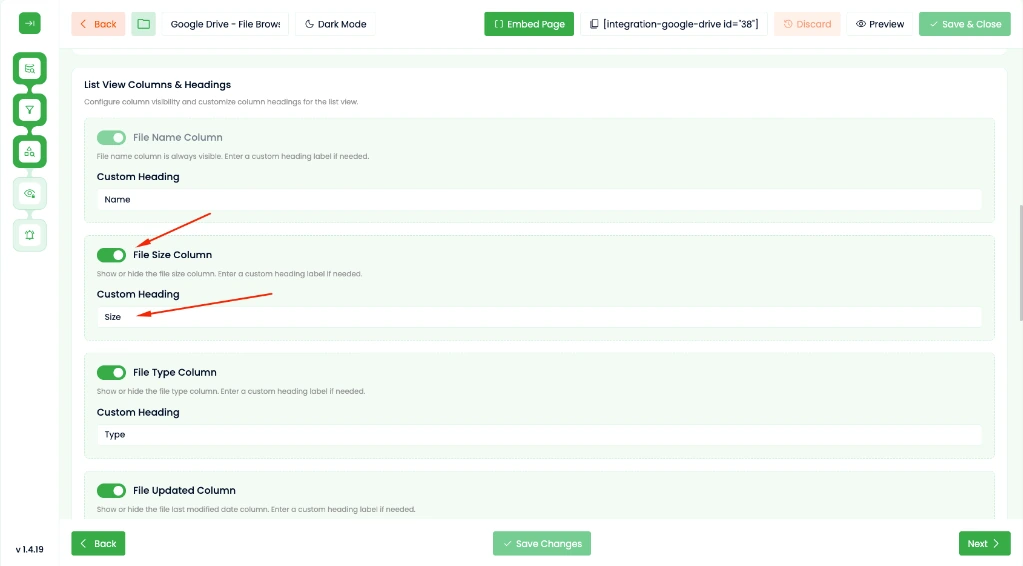
In previous versions, the list view table in the File Browser and Search Box modules displayed a fixed set of columns. In version 1.4.19, you have full control over what columns appear and what their table headers say.
These settings are configured per-module inside the Module Builder and apply automatically across desktop and mobile views.
File discovery in large Google Drive folders is now significantly faster and more forgiving with our new Pro search engine.
q4 financial report for a file named q4-financial_report.pdf). Version 1.4.19 automatically matches words across common punctuation and space separators.,), semicolons (;), or pipes (|). For example, invoice, bill, receipt, payment or docs | documentation | guides are parsed seamlessly.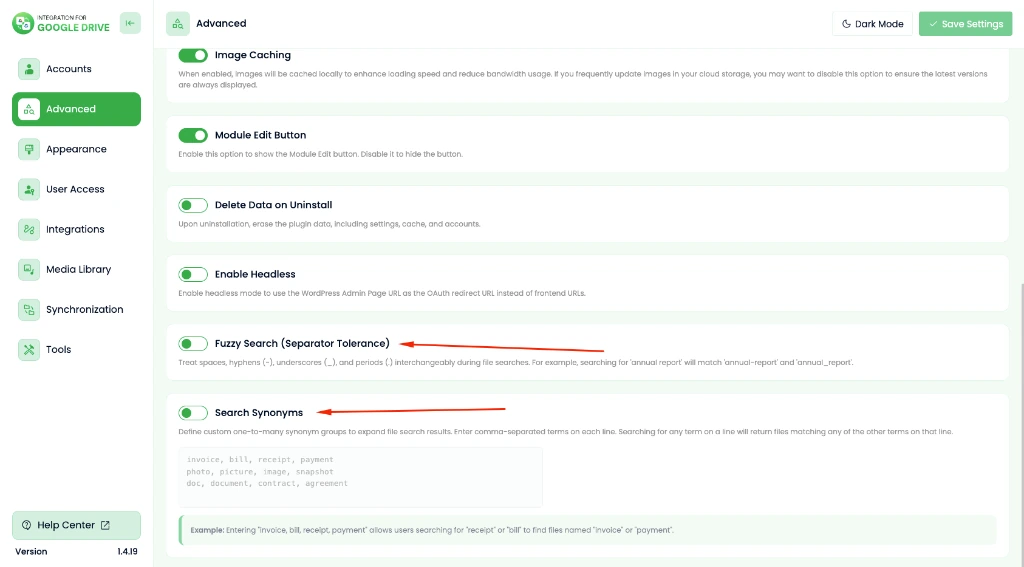
Previously, selecting a file in the File Browser module generated a temporary ZIP archive before starting the download. While ZIP archives are necessary when bundling multiple selected files or entire folders, compressing a single file wastes server memory and adds an unnecessary step for the user.
In version 1.4.19, Pro users can choose between standard Google Drive Redirection (the default method) and direct streaming downloads. With direct streaming enabled, single files stream seamlessly from Google Drive according to Google Drive API standards, bypassing server-side ZIP packaging, starting instantaneously, and preserving exact filenames, casing, brackets, and spaces.
Modern WordPress versions (6.3 through 6.9) render the block editor editing canvas inside an isolated <iframe>. Version 1.4.19 modernizes our Gutenberg integration to align with the latest WordPress Block Editor standards:
enqueue_block_assets hook, eliminating the browser console notice: ccpigd-admin-css was added to the iframe incorrectly.Creative agencies and specialized businesses store diverse file formats in Google Drive. Version 1.4.19 expands filename and upload handling for uncommon file extensions (such as .cbz, .cbr, .gcode, .ai, .eps, and .indd), ensuring file extensions are never accidentally stripped during uploads or downloads.
For users leveraging our cloud backup and migration features, 1.4.19 includes critical stability fixes:
For a detailed walkthrough on setting up cloud backups with Google Drive, check out our guide on WordPress Site Backup, Restore & Migration with Google Drive.
Updating and installing is straightforward:
Version 1.4.19 is fully backward-compatible with all existing modules, shortcodes, and integrations. Learn more on the official Integration for Google Drive product page or check our documentation portal.
This post is by Tanin Ahmed, a member of the CodeConfig team who is always working to find solutions for our users and improve our services.
Thank you for reading and for your kind words and good wishes for us. We truly appreciate your support! ❤️


Whether you're just getting started or scaling fast, we've got you covered. Access helpful guidance.

