


- Release
- WordPress
File Manager for Dropbox 1.3.17 Released – New Features and Improvements
Tanin Ahmed7 min read
Loading page…
Loading page…
Loading page…
This step-by-step guide will show you how to embed Google Drive docs in WordPress using the secure ‘Integration for Google Drive’ plugin.
Managing documents across different platforms can be a logistical headache. If you frequently update reports, whitepapers, or collaborative guides in Google Docs, manually copying that content into WordPress every time a change is made is a massive time-sink.
The solution is to sync your cloud storage directly with your site. In this guide, we’ll show you exactly how to embed Google Drive docs in WordPress so your website stays updated automatically whenever you edit your source files.
Instead of using clunky “Publish to web” frames, this plugin gives you a faster, cleaner, and more secure way to embed Google Drive files in WordPress.
It’s a reliable and beginner-friendly solution for embedding Google Docs and other Drive files in WordPress.
Follow these straightforward steps to embed your documents in minutes.
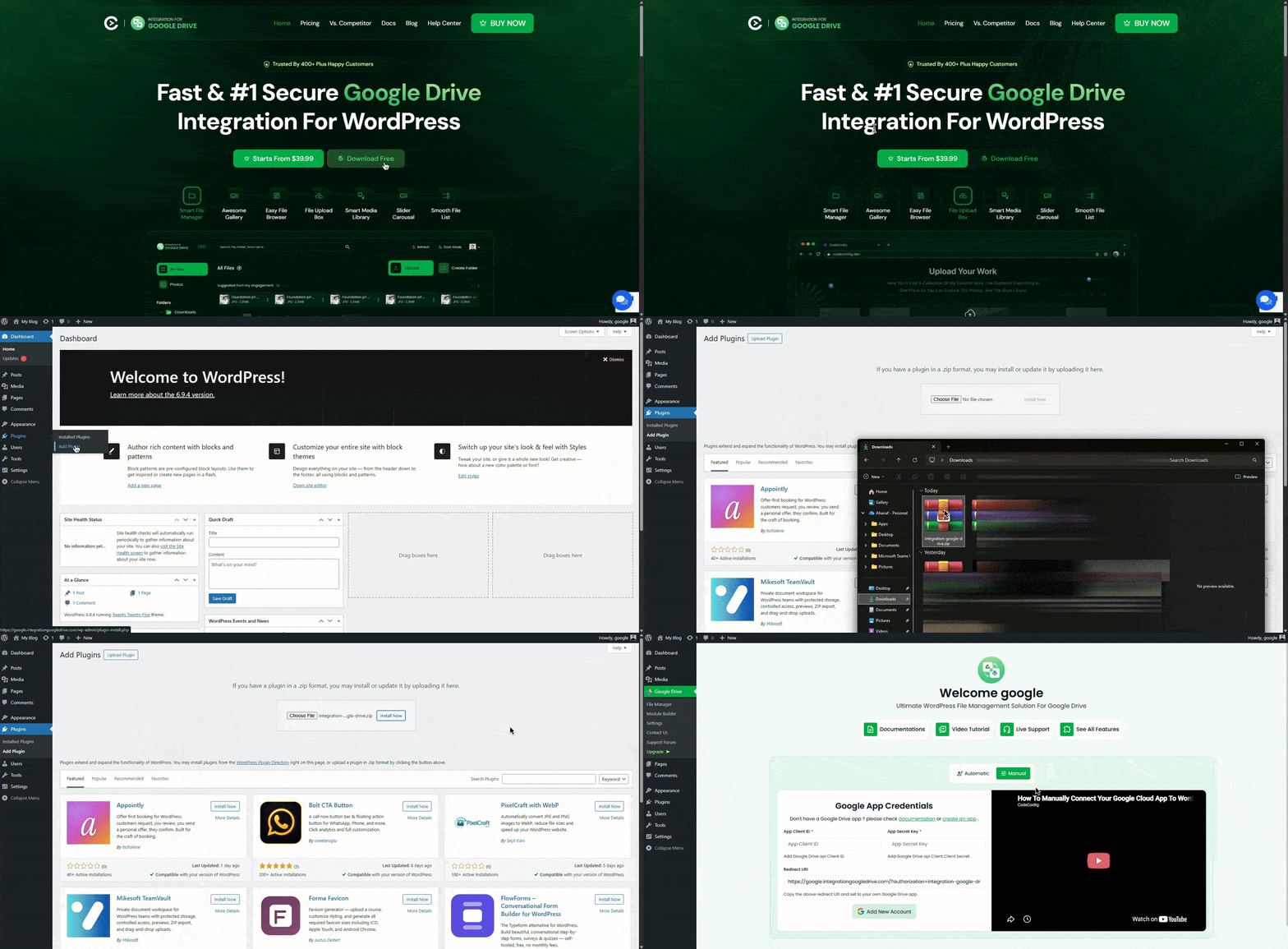
Once connected, your Google Drive folders and files will appear inside the WordPress dashboard for easy management.
Shortcodes provide flexible placement anywhere on your site.
This plugin makes it easy to Embed Google Drive Docs in WordPress using shortcodes, and its inline preview feature ensures a smooth viewing experience for your documents.
For an even smoother workflow:
This converts Google Drive Docs and files into fully usable media items within your WordPress media library.
Integrating your documents directly into your website offers several strategic advantages:
These benefits make it clear why many businesses, educators, bloggers, and teams choose to embed Google Drive Docs in WordPress when working with dynamic, frequently updated content.
Permission errors are the most common issue when you embed Google Drive Docs in WordPress. If you see “Access Denied,” double-check your OAuth scopes in Google Cloud Console. For missing files or sync delays, clear the plugin cache or reconnect your account. The Integration for Google Drive plugin helps reduce these issues by handling links and permissions automatically, but if problems continue, check the documentation or contact support.
Learning how to embed Google Drive docs in WordPress is a game-changer for content managers and businesses that rely on dynamic documentation. By using a dedicated Google Doc embedder, such as the Integration for Google Drive plugin, you save time, reduce manual errors, and provide a better experience for your readers
Stop copying and pasting—start syncing!
Have questions about the process? Feel free to drop a comment below. I’m happy to help!
This post is by Jakir, a member of the CodeConfig team who is always working to find solutions for our users and improve our services.
Thank you for reading and for your kind words and good wishes for us. We truly appreciate your support! ❤️


Whether you're just getting started or scaling fast, we've got you covered. Access helpful guidance.

